You kept every file.
Now find what's in them.
Orcah indexes the video on your drives and NAS, so you can search what was said, who was there and what was on screen without opening a single file.
- Main SSD Data/iPhone2,029
- GoPro/Nas298
- GoPro/100GOPRO135
- SD Card October 2026/DCIM53
- GoPro/Tazeka Bike Trip44
- OLD HDD 80 GB25 of 1,171 files
Video counts per folder. Other files are skipped.
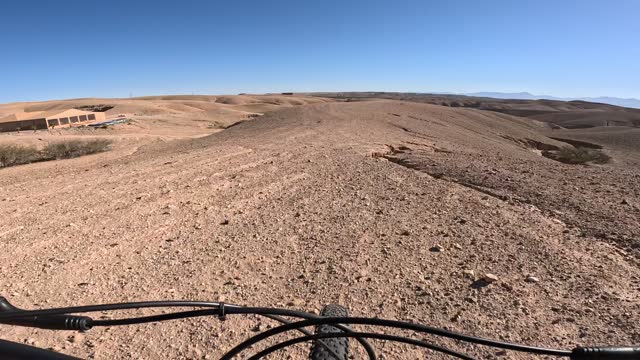 GoPro/2023-12-10/HERO11 Black 2/GX015842.MP4at 00:38
A cyclist advances forward on a gravel path through an arid, rolling landscape.
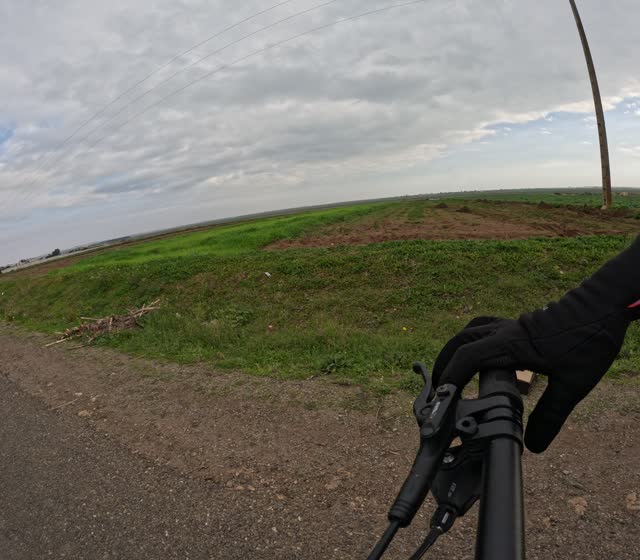 GoPro/Nas/2023-12-30/HERO11 Black 2/GX015911.MP4at 00:18
A gloved hand grips a black bicycle handlebar.
Free and open source (AGPL-3.0). Runs next to your NAS; NVIDIA GPU optional.
Saving it was the easy part.
The footage is all there. Finding one moment in it means guessing a folder, opening files and scrubbing.
Filenames say nothing
IMG_4128 1.MOV and GX015911.MP4 don't tell you who was there or what happened.
It's spread across drives
Phone backups, camera cards and an old 80 GB disk, each with its own folder logic.
Scrubbing doesn't scale
At 6,065 files, opening them one by one isn't a search. It's an afternoon.
It searches video. Only video.
Orcah isn't a search engine for your whole archive. It indexes the video files and leaves everything else alone.
The old 80 GB disk in the demo holds 1,171 files: PNGs, PSDs, fonts, zips and 25 MP4s. Orcah indexes the 25 videos and skips the rest.
- Docker
- .mp4, .mov, .avi, .mkv, .mxf
- Mac app
- .mp4, .mov, .m4v, .avi, .mkv, .webm, .ogv and .mxf
- Not indexed
- Photos, documents, audio-only files
- Your files
- Not moved, renamed or re-encoded
Search by whatever you remember.
Each video is split into scenes, and every scene is indexed several ways.
What was said
Every clip is transcribed, so a quote finds the second it was spoken.
Who was there
Label a face once and find every scene that person is in.
What was in frame
Objects like a bike, a dog or a car.
Text on screen
Signs, captions and date stamps caught on camera.
What happened
Plain-English descriptions of each scene.
Two ways to run it.
If your archive lives on a server, the Docker version runs next to it. If you edit on a Mac, the app goes straight into your timeline.
| Docker version | Mac app | |
|---|---|---|
| Price | Free, open source (AGPL-3.0) | $199 once, 30-day refund |
| Runs on | Any machine with Docker; NVIDIA GPU optional | M1 or later Mac, macOS 14+, 16 GB+ memory (64 GB recommended) |
| Interface | Web app in your browser | Native Mac app |
| Getting clips out | Export the scenes you found as one stitched video | Send to Final Cut Pro, DaVinci Resolve or Adobe Premiere Pro |
| Integrations | Immich people, REST API, MCP | Strava rides, MCP |
The Docker version has 1,800+ stars on GitHub and started as a post on r/selfhosted. Running it on a home server? See the setup details or read the code.
Questions about big archives
Something else? Email us.
Does Orcah index photos, documents or audio files?
No. Orcah only indexes video files. The Docker version reads .mp4, .mov, .avi, .mkv and .mxf. The Mac app reads .mp4, .mov, .m4v, .avi, .mkv, .webm, .ogv and .mxf. Everything else on the drive is ignored.
Does it move, rename or re-encode my files?
No. Your files stay where they are, with the names they have. Orcah keeps its index separately. MXF files are transcoded to a working copy before indexing, which uses some extra space.
Can it read footage on a NAS?
Yes. The Mac app reads network volumes mounted in Finder. The Docker version reads any folder you mount into its containers, including a NAS share mounted on the host.
What can I search by?
What was said (transcription), faces you've labeled, objects, text that appears on screen, and plain-English descriptions of each scene.
Does my footage leave my machine?
Not with the Mac app, which indexes on your Mac, or with the Docker version and Ollama. If you choose Gemini as the Docker version's AI provider, that part runs on Google's cloud.
Which version should I use?
If you already run Docker on a server or NAS, start with the free Docker version. If you want a native app on an Apple Silicon Mac that sends clips straight to Final Cut Pro or DaVinci Resolve, use the Mac app. Docker setup details
Every file kept.
Every moment found.
Free and open source, AGPL-3.0.
Prefer a native Mac app? Get Orcah Studio for Mac · $199 once, no subscription, 30-day refund.